라벨이 Flutter인 게시물 표시

플러터 단축키

1. 위젯 감싸기/벗기기 비주얼 스튜디오 :   Cmd + . 안드로이드 스튜디오 : Alt + Enter 2. 코드 정렬 비주얼 스튜디오 : Ctrl + S 안드로이드 스튜디오 : Ctlr + Alt + L 3. StatelessWidget -> StatefulWidget Alt + S 맥 에서는 Alt 대신 Option 키

Flutter Doctor [!] Android Studio X Unable to find bundled Java version.

이미지
[!] Android Studio X android-studio-dir = c:\Program Files\Android\Android Studio X Unable to find bundled Java version. Copy jbr to jre Ctrl+C jbr Ctrl+V jre if you mac OS cd /Applications/Android\ Studio.app/Contents/jre ls if you see only Contents Folder ln -s ../jre jdk

Flutter Error : Android Simulator is gone

I decided to leave the Big Sur MacOS due to various problems. Upgrading to Monterey made it much lighter. Android Studio > File > Project Structure... then you can see. <NO SDK> yes, that's the problem. and Run Terminal flutter config --android-sdk /Users/YourName/Library/Android/sdk

Flutter iOS Device Run Error : workmanager...

CocoaPods could not find compatible versions for pod "workmanager": In Podfile: workmanager (from `.symlinks/plugins/workmanager/ios`) Edit this > ios\Podfile and Run iOS Device # Uncomment this line to define a global platform for your project platform :ios, '9.0'

Flutter Alerts : CocoaPods 1.9.3 out of date (1.10.0 is recommended).

brew upgrade gem uninstall cocoapods pod --version brew install cocoapods pod --version sudo gem pristine ffi --version 1.13.1 flutter doctor -v

Flutter Doctor Alerts : x Unable to find bundled Java version.

cd /Applications/Android\ Studio.app/Contents/jre ln -s ../jre jdk ln -s "/Library/Internet Plug-Ins/JavaAppletPlugin.plugin" jdk flutter doctor -v

Flutter JDK Error with MacOS Big Sur

FAILURE: Build failed with an exception. * What went wrong: Execution failed for task ':path_provider:compileDebugJavaWithJavac'. > Could not find tools.jar. Please check that /Library/Internet Plug-Ins/JavaAppletPlugin.plugin/Contents/Home contains a valid JDK installation. * Try: Run with --stacktrace option to get the stack trace. Run with --info or --debug option to get more log output. Run with --scan to get full insights. * Get more help at https://help.gradle.org BUILD FAILED in 1m 1s Exception: Gradle task assembleDebug failed with exit code 1 I use MacBook with Catalina OS. and never update OS. But one day, it was suddenly updated to BigSur. what!? I Actually did't check Update. And I updated Android Studio, but the Project did not run. so I Open the Terminal and Find Java Location. tools.jar copied and pasted it there. That's all. But why was the MacBook operating system updated? /usr/libexec/java_home -V | grep jdk 1.8.261.12 (x86_64) ...

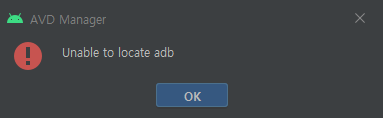
AVD Manager ! Unable to locate adb 에러

이미지
안드로이드 스튜디오에서  AVD Manager 를 실행하고  Create Virtual Device 를 추가한 후  Actions 에서 Launch this AVD in the emulator 를 누르면 볼 수 있는 에러이다. 해결방법은 Android Studio > File > Project Structure... 로 들어가면 이렇게 <No SDK> 빨간색으로 보이는데,  Create Virtual Device 의 API 와 같은것으로 고르면 된다.

플러터의 바뀐 리스트, Null Safety

이미지
플러터가 업그레이드 되면서,  널세이프티 가 적용되었다. Null 값을 가지는것과  Null 값을 가지면 안되는것을  구분해 둔것. 기존엔 모든 변수의 Null 을 체크했지만,  Null 값을 가지는 nullable 만 체크하도록해,  속도를 향상시켰다고 한다. 그래서 Null 값을 가지면 안되는  List 는 Null Safety 가 되면서,  코드를 쓰는 방식이 바꼈다. //old List<foo> fooList = List(); List<foo> fooList = new List<foo>(); //new List<foo> fooList = <foo>[]; List<foo> fooList = []; fooList = []; int fooLength = 5; string fooText = 'hello'; FooClass fooFunction(int idx) => FooClass(id: idx); List<FooClass> fooList = List<FooClass>.empty(growable: true); List<String> fooList = List<String>.filled(fooLength ,fooText , growable: true); List<FooClass> fooList = List.generate(fooLength, fooFunction, growable: true); 예전방식으로도 동작은 하지만, 권장하지 않는다. 출처 : https://master-api.flutter.dev/flutter/dart-core/List-class.html

플러터의 바뀐 버튼

이미지
플러터가 업그레이드 되면서 기존에 사용하던 버튼 테마와 위젯들이 각각의 테마를 가지는 버튼 위젯으로 바꼈다. ButtonTheme, FlatButton > TextButtonTheme, TextButton ButtonTheme, RaisedButton > ElevatedButtonTheme, ElevatedButton ButtonTheme, OutlineButton > OutlinedButtonTheme, OutlinedButton 기존의 코드들을 그대로 쓸 수 있지만, 권장하진 않는다. 출처 : https://flutter.dev/docs/release/breaking-changes/buttons

안드로이드 스튜디오, 자동 줄맞춤

이미지
Windows : Ctrl + Alt + L Linux : Ctrl + Shift + Alt + L macOS : Option + Command + L

플러터 에러 ERR_CLEARTEXT_NOT_PERMITTED

이미지
Flutter WebView Error net::ERR_CLEARTEXT_NOT_PERMITTED 1. 안드로이드 /android/app/src/main/AndroidManifest.xml 파일 usesCleartextTraffic  을 True 로 설정, 없으면 추가 <application ...     android:usesCleartextTraffic="true" ... > 2. iOS /ios/Runner/Info.plist 파일 수정 <key>NSAppTransportSecurity</key> <dict>   <key>NSAllowsArbitraryLoads</key><true/>   <key>NSAllowsArbitraryLoadsInWebContent</key><true/> </dict>

플러터 에러 : 껐다 켜라

이미지
type 'MyApp' is not a subtype of type 'StatelessWidget' in type cast 앱을 많이 고치다 보면 상태위젯 타입캐스트 에러가 뜬다. StatelessWidget 에서 StatefulWidget 으로 바꿨다면 핫리로드만 해서는 안되며 앱을 껐다 켜야만  정상적으로 작동한다.